¶ Overview
iBroadcast offers a free plan and two Premium plans. Our free plan is fully functional at no cost. Becoming a Premium member gives you more storage and streaming, access to additional features, and helps support the service you love!
- Premium Basic: $1.99/month or $21.99/year
- Premium Unlimited: $4.99/month or $54.99/year
Both Premium plans include all Premium features. The only difference is how much storage and bandwidth you get. To see everything Premium offers, visit our Premium page.
Ready to upgrade? Go to Profile > Account & Membership in the iBroadcast app or on the website. You can cancel anytime, with no long-term commitment.
¶ Try Premium Free for 30 Days
Uploading your collection and getting to know how iBroadcast organizes it takes some time, so we offer a long free trial. You get 30 days to explore everything Premium has to offer before you commit!
To start your trial, go to Profile > Account & Membership and choose a plan. You'll need to enter a payment method, but you won't be charged during the trial. When the trial ends, your monthly membership begins automatically unless you cancel before then.
¶ Upcoming Changes
The new free plan limits take effect on January 10, 2027. If your library is over the free limit, now is a good time to check your usage and free up space.
If you're already a Premium member, your current rate stays the same until your first renewal after January 10. At that point, your membership will renew at the new Premium Unlimited rate of $4.99/month or $54.99/year. If your library fits within 25 GB, you can switch to Premium Basic instead.
Please check out the announcement on our News and Updates page for more info!
¶ Free vs Premium
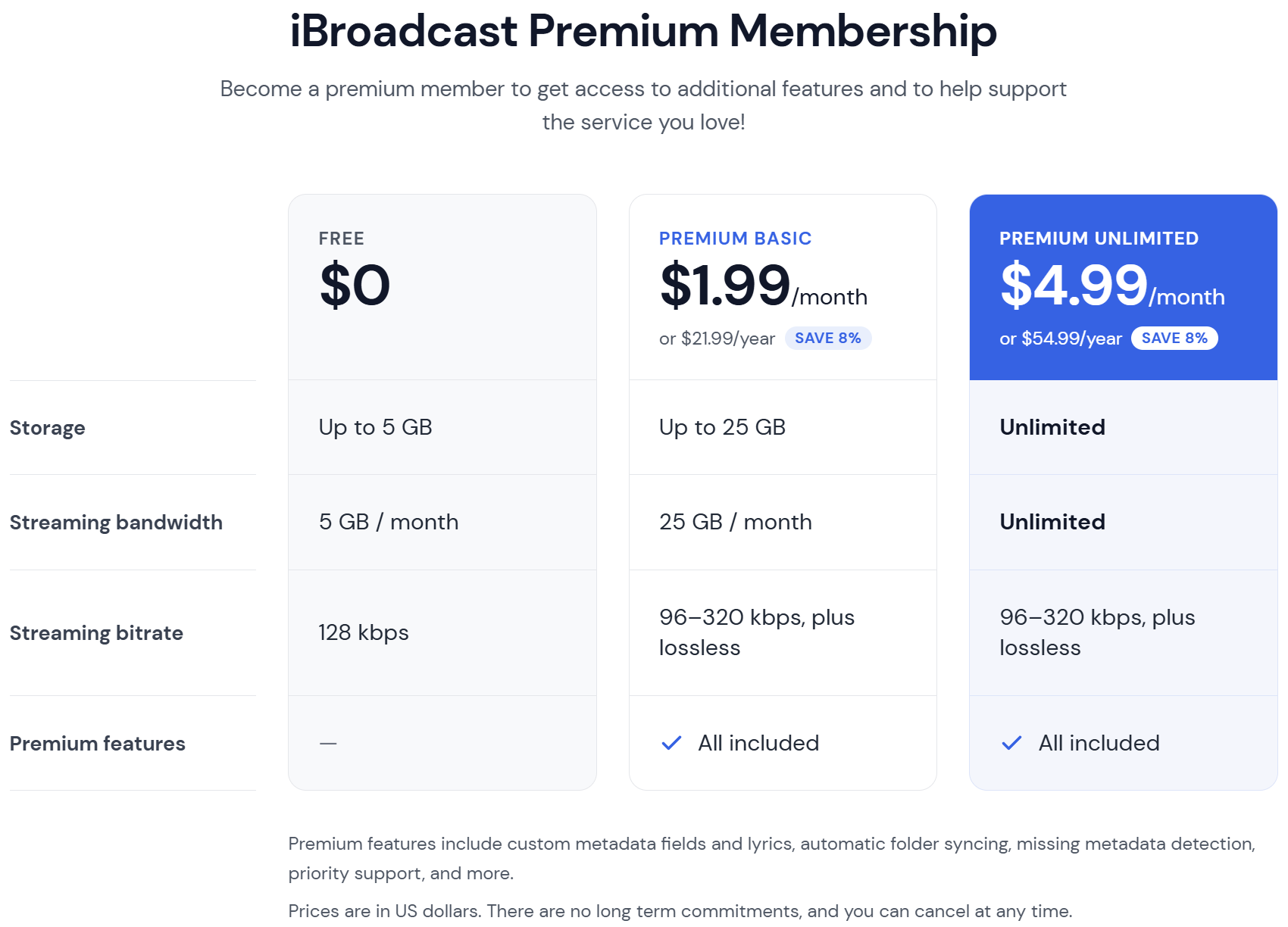
¶ Plans at a Glance
Free: Up to 5 GB of storage and 5 GB of streaming per month at 128 Kbps. Includes all core features for uploading and listening, redownloading your original files, standard customer support, and no ads, at no cost.
Premium Basic: Up to 25 GB of storage and 25 GB of streaming per month, plus all Premium features. $1.99/month or $21.99/year.
Premium Unlimited: Unlimited storage and streaming, plus all Premium features. $4.99/month or $54.99/year.
¶ Pricing and Payment
¶ Availability
- iBroadcast is available worldwide (both Free and Premium plans).
- Subscribing through the app is available anywhere the Google Play Store or the Apple App Store accept in-app purchases.
¶ Pricing Outside the US
- All prices are listed in US dollars.
- When you subscribe on our website, you'll pay the equivalent of the US dollar price in your local currency, based on the current exchange rate.
- If you subscribe through Apple or Google in the mobile app, the price will be similar, but it may differ slightly because the app stores round their prices.
¶ Payment Options
You can pay with credit card, PayPal, Google Pay, or Apple Pay.
¶ Managing Your Subscription
¶ Automatic Renewal
Premium subscriptions renew automatically unless you cancel.
¶ Failed Renewal
If your payment fails (e.g., expired card), simply re-subscribe with a valid payment method.
¶ Transfer Between Accounts
- Premium memberships can be transferred. Contact support from the current Premium account and provide the email for the destination account.
- If deleting your account and starting fresh, let us know before deleting so we can note the membership and transfer it once you sign back up.
¶ Canceling Your Membership
Where you cancel depends on where you signed up (website or app). Go to Profile > Account & Membership on the website or in the app for instructions.
¶ Storage and Streaming Limits
¶ Checking Your Storage
- Web: click the three dots next to My Library > Library Summary
- Mobile: go to Profile > Library Summary
Your Library Summary shows the storage used by:
- Available files: the files actively in your library
- Unavailable files: trashed files, duplicates, and any corrupted files or files with processing errors
¶ Freeing Up Storage
Unavailable files count toward your storage. Go to your Track Dashboard to restore them to your library, or permanently delete them to free up space.
¶ Checking Your Streaming Usage
To see how much you've streamed this month, go to Profile > Account & Membership.
¶ If You Go Over Your Storage Limit
- Files beyond the limit are hidden, starting with your newest uploads, and your oldest files stay available. Nothing is deleted.
- Hidden files come back as soon as you upgrade or free up space.
- If you're on the free plan, you can also start a free 30-day trial of Premium.
¶ Additional Information
¶ Lifetime Subscription
We don't offer lifetime memberships because we incur ongoing costs for streaming, storage, and support. (Services like Plex sell software licenses, while you cover hosting—our model is different.)
¶ Other Ways to Support
The best support is subscribing to Premium. But if you'd like to help further, consider leaving a review on the App Store or Google Play, or follow us on social media.